Markerless motion capture for golf
Golf swing analysis, from one phone video
Film a swing from behind down the target line, or face on, and read it as numbers: address, takeaway, top, impact and finish found for you, the tempo, and how the posture, hips and head move through the swing — with the hands' path drawn on the video. No sensors on the club or the golfer, no launch monitor needed for the body.
Plans from $29/month · Cancel any time
Golf swing · down the line
one real clip →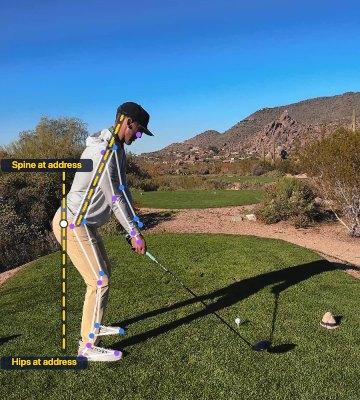
Address
0:01.50
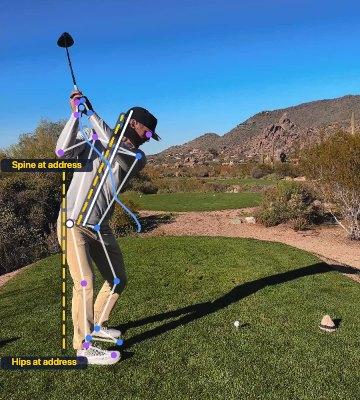
Top
0:02.04
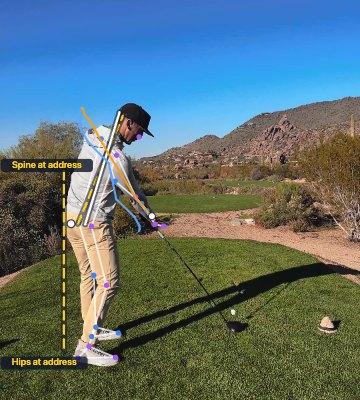
Impact
0:02.34
Through the swing
| Tempo | 0.50 s back : 0.29 s down | 1.7 : 1 |
| Posture held | spine at impact vs address | −5° |
| Hips toward the ball | by impact | 7.5 cm |
| Trail knee straightens | by the top | 24° |
Tagged
0:02.34Impact — hips 7.5 cm toward the ball, past the 5 cm guide: early extension
…plus the hands' path on the video and every joint, every frame, as JSON or CSV.
2
camera positions, each read its own way
6
swing points found for you
33
body points tracked per frame
0
sensors on the club or golfer
Built for the way swings are coached
The two views coaches already film
Down the line shows posture and the hands' path; face on shows sway, weight shift and the head. Pick the view you filmed and the report reads the swing the way a coach watching from there would.
The swing's moments, found for you
Address, the first move, the takeaway, the top, impact and the finish are found from the hands. Each is one click from the video, and any that's off can be stepped to the right frame and set by hand.
Numbers for what you see at full speed
Standing up out of posture, the hips moving toward the ball, the head dropping, the trail knee straightening, a backswing that's rushed: each becomes a reading you can compare from lesson to lesson.
What it measures in a swing
One camera, one swing, read at the moments that matter — against starting guides, not verdicts.
Tempo
Backswing time over downswing time, from the first move to the top to impact. Good players cluster near 3 : 1 whatever their speed; the report gives the ratio with its margin at your frame rate.
Range of motion→Posture, down the line
The spine's forward bend at address and whether it holds to impact, the hips moving toward the ball (early extension), the head dropping or lifting, and the trail knee keeping its flex — with the address lines held on the video to show it.
Angle charts→Sway and weight shift, face on
How far the pelvis slides away from the target in the backswing, where it sits between the feet at the top, impact and finish, whether the head stays behind the ball, and an estimate of shoulder and hip turn.
A face-on example→Before and after a lesson
ProSave the swing from the start of a lesson and from the end, and read them side by side — the same readings, the same frames, the change in numbers.
Side-by-side comparison→Each golfer over time
File every swing under the golfer and follow them from one session to the next.
People and progress→A report they can open
Send the golfer a view-only link to their own swing — the video with the hands' path and the skeleton drawn on, and the readings beside it. No account needed to watch it.
Shareable links→
From a swing to numbers
- 01
Film from behind or face on
Phone on a tripod at about hand height. Down the line: behind the golfer, on the target line. Face on: square to their chest. Keep the whole golfer in frame from address to the finish — 60 fps or more if the phone can.
- 02
Pick the golf view
Choose Golf — back view (down the line) or side view (face on). The swing's points are found, the tempo timed, and the readings set against starting guides.
- 03
Check the points
Jump to address, the takeaway, the top, impact or the finish. If one is a frame out, step the video to the right frame and set it — every reading follows.
- 04
Share and track
Send the golfer a link, file the swing under them, and export every joint on every frame as JSON or CSV.
Every frame, in a spreadsheet
The angles CSV has one row per frame and one column per joint, timed from the start of the clip. These rows are the example swing through impact, with the engine's own clockwise angles as the download keeps them; the low back is calculated from the landmarks, and the file says so.
Everything in the exports→Open a real report like this→# Down the line, 24 fps · impact at frame 56 (2.336 s)
frame,time_s,right_hip,right_knee,left_knee,low_back
53,2.211,139.5,218.2,224.7,157.2
54,2.252,140.6,222.5,206.9,159.0
55,2.294,141.3,218.7,199.3,161.2
56,2.336,146.2,210.3,193.5,162.9
57,2.377,147.6,198.4,185.2,162.2Is it the right tool?
Worth knowing before you sign up, not after.
A good fit when
- You coach, or practise, with a phone on a tripod behind or in front of the golfer
- You want to follow posture, tempo and sway from lesson to lesson more than one absolute number
- You want a report the golfer can open, with their swing drawn on
- You want the data out, to analyse in your own tools
Look elsewhere when
- You need club or ball data — clubhead speed, face angle, path, launch — which come from a launch monitor, not from video of the body
- You need true 3D rotation, or ground forces, which a single camera can't give
- The camera can't be set square — down the target line or to the golfer's chest — with the whole swing in frame
- You need lab-grade joint angles for publication without validating them yourself
Range of motion, tags, people and shareable links are on every plan, from $29/month. Comparing two swings side by side and smoothing filters come with Pro ($59/month). Working alongside other coaches? Advanced includes 5 seats.
Compare plans→The features behind it
Range of motion
Fourteen joint angles, measured on every frame
Read more →Tags, comments and clips
Pin what you noticed to the frame where you noticed it
Read more →People & progress
Everyone you measure, session by session
Read more →Side-by-side comparison
ProTwo measurements, lined up on the same moment
Read more →Shareable links
Send a report or an exercise to anyone — no account needed
Read more →Take the data with you
JSON and CSV for everything, with the provenance attached
Read more →
Also see: Markerless motion capture for indoor rowing · Markerless motion capture for indoor cycling · How markerless motion capture works · Markerless for biomechanists
Further reading: Spine angle at address · Sway and weight shift, face on · Golf swing tempo
Questions, answered
Can you analyse a golf swing from a phone video?
Yes, for the body. Markerless tracks 33 body points on every frame, finds the swing's key moments from the hands, and reads tempo, posture, the hips, the head and — face on — sway and weight shift. It doesn't track the club or the ball.
Where should I put the camera?
Two positions, the ones coaches use. Down the line: behind the golfer, on the target line, at about hand height. Face on: square to the golfer's chest, at the same height. Either way, the whole golfer stays in frame from address to the finish, on a tripod rather than in a hand.
What frame rate do I need?
Ordinary 24–30 fps is enough for address, the top and the finish. The downswing takes about a quarter of a second, so at those rates impact falls between frames and the tempo carries a margin, which the report shows. 60 fps or more, which most phones can film, halves it.
How are address, the top and impact found?
From the hands, which hold the club together: the top is their highest point, impact the first frame where they reach their lowest on the way down, the finish where the body settles. Any point can be stepped a frame at a time and set by hand, and the readings follow.
Does it measure clubhead speed or ball flight?
No — those come from a launch monitor. What Markerless adds is the body behind those numbers: the positions and timing that produce them.
Does slow motion work?
For positions and the tempo ratio, yes — both are the same at any playback speed. The backswing and downswing times are read on the clip's own clock, so in slow motion they're the slowed-down times.
How accurate is it?
We haven't published a validation study against marker-based motion capture, so treat the angles as a consistent measure of what the camera saw rather than a lab-grade absolute. That makes them strongest for comparing an athlete with their own earlier sessions, filmed the same way — which is most of what coaching and fitting need.