No markers. No suits. No lab.
Markerless motion capture, from a video on your phone
Film the movement. AI finds 33 body points in every frame and measures the angle at fourteen joints. You get the numbers in minutes — no markers to place, no suit to fit, nowhere to drive to.
Plans from $29/month · Cancel any time
Shoulder abduction · filmed front-on
one phone →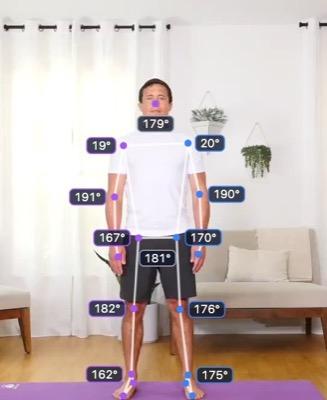
Start
shoulder 20°
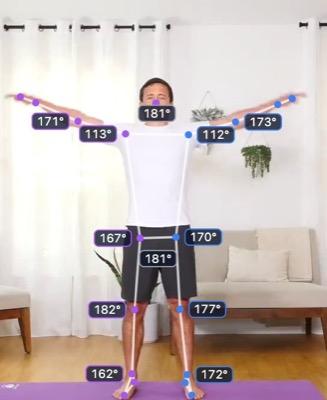
Rising
shoulder 112°
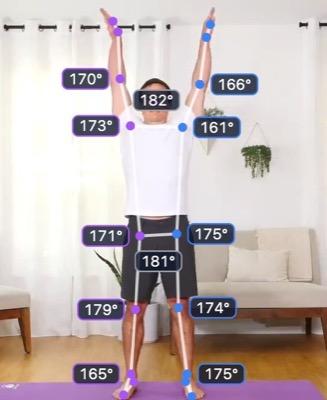
Top
shoulder 161°
Range of motion
| Left Shoulder | 19.8°–162.4° | 142.6° |
| Right Shoulder | 19.2°–173.7° | 154.5° |
| Low back | trunk held still | 0.8° |
…and eleven more joints, every frame, as JSON or CSV.
1
camera
0
markers or suits
33
body points per frame
14
joint angles per frame
Motion capture without the motion capture lab
Nothing touches the athlete
No markers to place, no suit to fit, no sensors to strap on. Press record and the setup is done.
Capture where it happens
The gym floor, poolside, the pitch, the workshop. No camera volume to book and nobody has to travel to a lab.
Numbers, not just a video
Fourteen joint angles on every frame, with min, max and range per joint — exportable as JSON or CSV the moment it lands.
How AI markerless motion capture works
Four steps, of which only one is really the AI.
- 01
Film it
One camera, square-on, whole body in shot. A phone is enough.
- 02
The model finds the body
A pose network trained on labelled human images predicts 33 body landmarks in every frame. Your video is not used to train anything.
- 03
Angles come from geometry
Each joint angle is the angle between the two segments meeting at it — trigonometry over the landmarks, not a second guess by the model.
- 04
Check it, then take it
The tracked skeleton is drawn over your video, so you can see what the model saw before you trust a number.
Worth separating those, because “AI” gets used to cover both. The network estimates positions. The angles are then ordinary geometry over those positions — reproducible, checkable, and the same calculation a marker-based system runs on its own coordinates. See what gets measured →
Markerless, marker-based and IMU
The three ways of turning movement into numbers, and what each asks of you.
| Markerless (AI) | Marker-based | IMU suit | |
|---|---|---|---|
| On the subject | Nothing | Markers placed by hand | A sensor per segment |
| Setup per person | None | 20–60 minutes | Strapping and calibration |
| Where you can capture | Anywhere you can film | Inside a camera volume | Anywhere, once fitted |
| Dimensions | 2D from one camera | 3D | 3D orientation |
| Main source of error | What the camera can't see | Marker placement, skin movement | Drift over time |
| Reference standard | No | Yes | No |
| Cost | A subscription | A lab | Hardware per subject |
Note the reference-standard row. Marker-based capture is the standard and markerless is not — which is why the sensible use of markerless is measuring change and comparing like with like, rather than quoting an absolute as ground truth.
What people measure with it
Sports science
Measure range of motion across a lift, a stride or a stroke — then put this session next to one from six weeks ago, lined up on the same instant of the movement.
Side-by-side comparison →Coaching
Pause on the frame where it went wrong, pin a note to it, and send the clip and the numbers together. The tags export with the data.
Tags and clips →Research
Everything exports, and every file records how it was produced — measured or calculated, which filter, which section of the clip.
Data export →App developers
Turn a movement into logic instead of a report: tag the stages of a rep and ship a counter that runs on-device.
Rep counters →
Is it the right tool for you?
Sometimes it isn't, and you should know that before you pay for it.
Yes, if
- You need to measure a lot of people, or the same person often
- You are tracking change over time rather than quoting an absolute
- You compare like with like — same camera, same angle, same framing
- The movement happens in a plane you can film square-on
- Capturing where the movement really happens matters to you
Probably not, if
- You need a defensible absolute number for a study judged on accuracy — use a marker-based lab
- The movement rotates out of the filmed plane, where a 2D angle reads short
- The subject is heavily occluded, in loose clothing, or filmed as a silhouette
- You need capture running live on a device — that is the QuickPose SDK, not this
One camera means two dimensions
A joint rotating away from the camera reads short. Film square-on and it is small; film at 45° and it is not.
It cannot see through the body
Filmed side-on, the far limbs are hidden. We flag joints whose tracking jumps rather than printing a confident range built on frames the camera never really saw.
Footage sets the ceiling
Loose clothing hides the landmarks. A low frame rate lets fast movement pass between frames. No software fixes either afterwards.
No validation study, and we say so
We have not published a comparison against marker-based capture. Treat the numbers as a repeatable measure of what is in the video, not as lab-grade ground truth.
Seven things worth more than any software
The footage sets a ceiling on the measurement. Get these right and everything downstream gets easier.
Tracking still jitters on good footage, and jitter inflates a range — the extremes of a noisy signal are the frames most likely to be wrong. That is what the smoothing filters are for.
- 01Square-on to the plane of the movement
- 02Whole body in frame, feet included
- 03Fix the camera — a handheld pan moves the reference
- 04Fitted clothing over loose
- 05Light from the front, never from behind
- 06The highest frame rate you can manage
- 07One person in shot
By sport
Single-camera markerless capture is at its best where the movement stays in one plane and in one place. Two sports where that's exactly how they're trained indoors:
Markerless motion capture AI, answered
What is markerless motion capture?
Markerless motion capture measures how a body moves from ordinary video, without attaching anything to the person. Traditional motion capture places reflective markers on anatomical landmarks and tracks them with a ring of calibrated cameras. Markerless replaces the physical markers with a model that infers where those landmarks are directly from the pixels — so one camera, no suit, no marker placement, and no capture volume to work inside.
How does AI markerless motion capture work?
A pose-estimation neural network, trained on a large set of images with human body landmarks labelled by hand, predicts the position of those landmarks in every frame of your video. That gives coordinates per frame. Joint angles are then computed geometrically from the coordinates — the knee angle is the angle between the thigh and the shank — rather than being predicted by the network. The AI locates the body; ordinary trigonometry does the measuring.
Is markerless motion capture accurate?
It depends on your footage, and marker-based capture in a lab is still the reference standard. Markerless measures what a single camera can see, so a joint rotating out of the filmed plane reads short, and occlusion, loose clothing, low frame rates and steep camera angles all cost accuracy. Where it is strong is repeatability and ecological validity: the same clip measured twice gives the same numbers, and you can capture in the gym or on the pitch rather than in a lab, which changes how people move. We have not published a validation study against marker-based capture, so we do not claim lab-grade accuracy.
Do I need a special camera?
No. A modern phone is enough. Framing matters more than the camera: square-on to the plane of the movement, whole body in shot, fixed position, decent light, and the highest frame rate you can manage.
Markerless or marker-based — which should I use?
If you need a reference-standard 3D measurement for a study judged on its absolute accuracy, use marker-based capture in a lab. If you need to measure movement repeatedly, in the place it actually happens, across more people than a lab session can process, markerless is what makes that possible at all. Plenty of people use both — markerless for volume and for tracking change, marker-based when a number has to be defensible in absolute terms.
Does it work in 3D?
Our measurements are 2D, taken in the camera's plane from a single video. True 3D markerless capture needs several synchronised cameras and the reconstruction that goes with them. For a lot of practical work — a knee through a squat, a shoulder through a press, an elbow through a curl — a well-framed 2D measurement answers the question, provided the movement happens in the plane you filmed.
What exactly can it measure?
Fourteen joint angles on every frame — neck, both shoulders, elbows, wrists, hips, knees and ankles, plus the trunk's lean off vertical — with the minimum, maximum and range for each across the clip or a section you mark. All 33 tracked body landmarks are available per frame too. Everything exports as JSON or CSV.
What happens to my videos?
They are stored against your team's account so you can come back to them, and they are processed to produce the measurement. They are not used to train any model.
Further reading
Wade, L., Needham, L., McGuigan, P., & Bilzon, J. (2022). Applications and limitations of current markerless motion capture methods for clinical gait biomechanics. PeerJ, 10, e12995.
A review of where markerless capture stands, and of the noise that makes filtering a normal step rather than an optional one.
doi:10.7717/peerj.12995
Needham, L., Evans, M., Cosker, D. P., et al. (2021). The accuracy of several pose estimation methods for 3D joint centre localisation. Scientific Reports, 11, 20673.
Measures how far pose-estimation joint centres sit from marker-based ones — the error a filter is and is not able to help with.
doi:10.1038/s41598-021-00212-x
You already have a clip you could measure.
Upload it and see the angles come back. No markers, no lab, nothing to calibrate.