No markers. No suits. No lab.
Get 33 markerless keypoints from videos for range of motion measurements, rep counting, body movement tracking and more
Upload one clip filmed on a phone. Markerless tracks 33 body points in every frame, measures the joint angles between them, and hands you the numbers — as JSON or CSV, or as rep-counting logic your app can run.
Plans from $29/month · Cancel any time
Shoulder abduction
one real clip →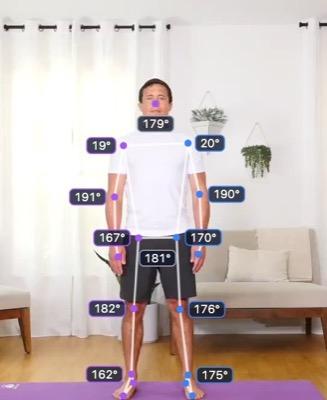
Start
Stage 1 · shoulder 20°
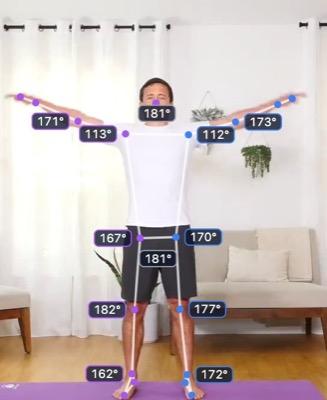
Rising
Stage 2 · shoulder 112°
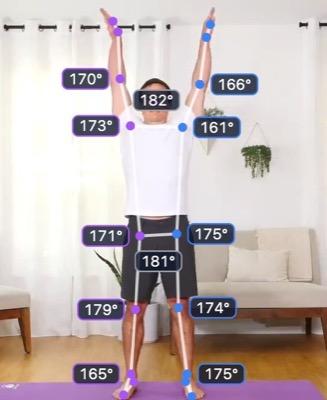
Top
Stage 3 · shoulder 161°
Range of motion
| Left Shoulder | 19.8°–162.4° | 142.6° |
| Right Shoulder | 19.2°–173.7° | 154.5° |
Tags & comments
- 0:01.9Top of the lift — left shoulder 162°, right 174°
- 0:01.9Trunk check — low back moves under 1° — no lean
Rep counter definition
"stages": [{
  "id": "stage_3",
  "name": "Top",
  "requirements": [
    { "joint": "shoulder", "side": "left",
      "min": 150, "max": 180 }
  ]
}]
Real clips, real reports
Each one filmed on a phone, measured by Markerless and shared view-only. Open a report and scrub through the video, the skeleton and every angle — exactly what you get from your own clip.
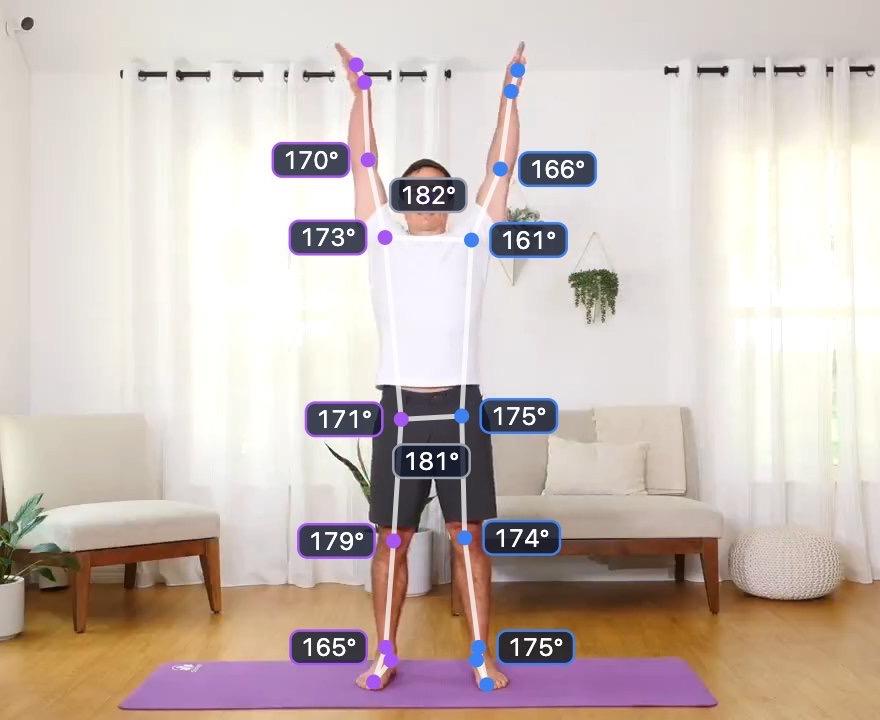 Top of the lift
Shoulder abduction, front-on
- Left shoulder range, 19.8° to 162.4°
- 142.6°
- Right shoulder range, 19.2° to 173.7°
- 154.5°
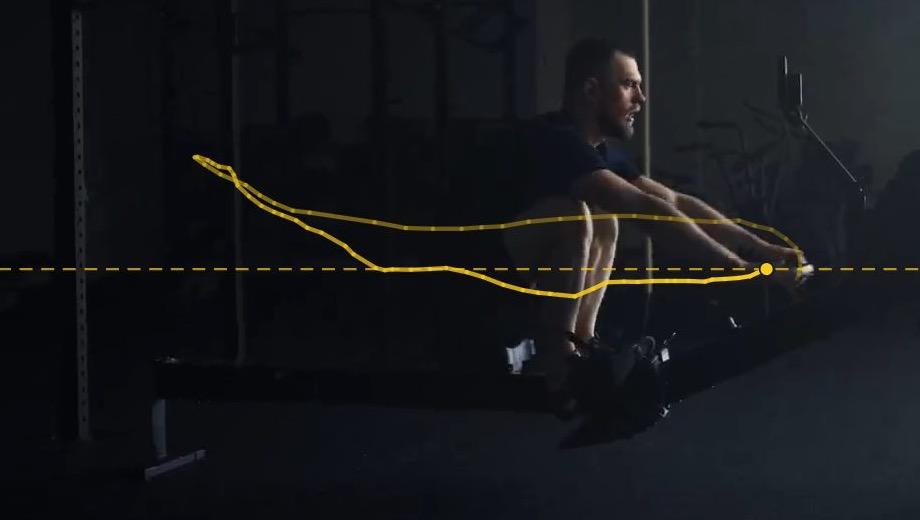 The handle's path through one stroke
Indoor rowing, side-on
- Stroke rate, 3 strokes
- 23 spm
- Drive to recovery
- 1 : 1.4
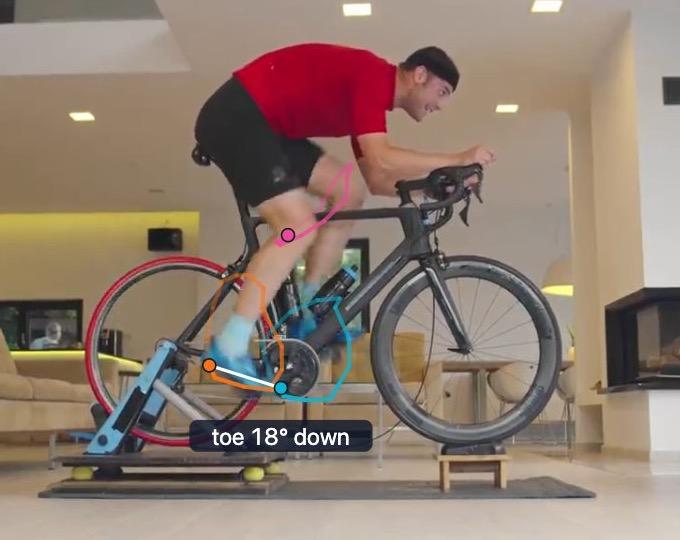 Knee, heel and toe through one revolution
Indoor cycling, side-on
- Cadence, 33 strokes
- 104 rpm
- Knee at the bottom, ±2.2°
- 158.4°
Measure a movement, or count reps in your app
Both run on the same pose engine and the same single clip. Pick the one that matches what you need out the other end — the measurements themselves, or logic your app can ship.
For biomechanists, sports scientists and coaches
Range of motion & biomechanics
Measure joint angles frame by frame across a movement, without markers or a capture lab. Annotate the video where it matters, then take the raw numbers away for your own analysis.
- Per-frame angles for 14 joints
- All 33 pose keypoints per frame
- Smoothing filters, applied to the downloads too
- JSON + CSV export of everything
For app developers
Rep counters & form feedback
Tag the stages that make up a rep, then export logic that counts reps on-device and shows your corrective cues when the movement goes wrong.
- Stage-by-stage rep logic
- Corrective feedback cues
- JSON that runs on any pose engine
What Markerless can do
No labelled datasets, no model training, no capture lab. Everything below works from the pose data in a single ordinary video — how markerless motion capture works, if you want the technique before the product.
Pose from ordinary video
No markers, no suit, no capture volume. One clip filmed on a phone is enough — Markerless compresses it in the browser and runs pose estimation on it.
Read more →Fourteen joints, every frame
Shoulders, elbows, wrists, hips, knees and ankles, plus the neck and the trunk — measured frame by frame in degrees, with the detected skeleton scrubbable against the video so you can see what the model saw.
Read more →Filter the noise, or don't
Markerless tracking jitters, and a jittery angle inflates a range. Put a Butterworth, Savitzky–Golay, median, moving-average or Kalman filter over the numbers and watch the charts settle — or leave it off and see exactly what the model saw. Every download records which filter was used.
Read more →Annotate what matters
Pause anywhere and tag the moment — a label plus a comment, pinned to its timecode. Jump straight back to any tag, and keep them with the clip for review.
Read more →Take the data with you
Joint angles and all 33 pose keypoints export as JSON or CSV, ready for a spreadsheet or your own analysis. Exercise definitions export as JSON your app can run.
Read more →
Simple monthly pricing
Every plan includes the full editor, range-of-motion measurement and rep counters. What changes is how many tokens you get each month, and how many people share the workspace. A token buys 12 seconds of analysed video — 5 a minute — so a plan stretches as far as you want to spread it, over a few long clips or a lot of short ones.
Basic
For a first movement — measured, or turned into a counter.
$29/month
- 150 tokens a month
- 30 min of video — a few long clips or a lot of short ones
- Range of motion, tags and data export
- Rep counting and stage tagging
- One measurement at a time
- Unfiltered angles
- 1 seat, more at $5/month each
Pro
Most popularFor regular work across a set of movements, with corrective feedback.
$59/month
- 600 tokens a month
- 2 hours of video — a few long clips or a lot of short ones
- Range of motion, tags and data export
- Corrective feedback rules
- Side-by-side comparison
- Smoothing filters on data and exports
- 1 seat, more at $5/month each
Advanced
For a team measuring and building a shared movement library.
$120/month
- 1,800 tokens a month
- 6 hours of video — a few long clips or a lot of short ones
- Range of motion, tags and data export
- Corrective feedback rules
- Side-by-side comparison
- Smoothing filters on data and exports
- 5 team seats, more at $5/month each
Enterprise
For high volume, longer clips and custom terms.
Custom
- Custom monthly volume
- Corrective feedback rules
- Smoothing filters on data and exports
- Unlimited team seats
- Priority support
Questions, answered
Something else? Ask us
Do I need any special equipment?
No. A single video from a phone is the whole setup — no markers, no suit, no capture volume, nothing to calibrate. Film the movement square-on to the plane you care about, with the whole body in frame and the joints unobstructed.
Which joints does it measure?
Fourteen, as angles in degrees on every frame, using an all-clockwise convention where 180° is a straight limb. Eight are measured by the engine itself — both shoulders, elbows, hips and knees. Six more are calculated from the detected landmarks: both wrists and ankles, the neck, and the trunk's lean off vertical. Every download says which is which, joint by joint. The landmark export goes wider still: all 33 pose keypoints per frame, from head to feet, with depth and visibility per point where the engine provides them.
Can I smooth the data?
Yes, on Pro and above. Pick from a zero-lag Butterworth low-pass (the convention in human-movement research, 4th-order, 6 Hz by default), Savitzky–Golay, a median filter, a moving average, or a Kalman filter with backward smoothing — each at three strengths. The charts, the live readouts and the min/max/range figures all update together, and the downloads carry the exact filter settings in the file so a colleague can see what was applied. Nothing is overwritten: the filter is a lens over the stored measurement, so switching it off gives the raw angles back. Which one to reach for depends on what you are fighting — a median is the one that removes a single wild frame where a limb was occluded, while Butterworth and Savitzky–Golay reduce general jitter without pulling the peaks in, which matters because a range of motion is read off the peaks.
How accurate are the measurements?
It measures what a single camera can see, so the honest answer is that it depends on your footage. Angles are computed in two dimensions from the camera's viewpoint, which means a joint rotating out of the filmed plane will read short, and occlusion, loose clothing, low frame rates and steep camera angles all cost accuracy. Film square-on to the movement for the closest results. We have not published a validation study against marker-based motion capture, so treat the numbers as a repeatable measure of what is in the video rather than a lab-grade ground truth.
What can I do with the exported data?
The CSV files open straight in a spreadsheet — one row per frame, one column per joint angle, or per landmark axis. The JSON is for scripts and pipelines. Your tags and comments come out alongside the numbers with their timecodes, so the notes stay attached to the measurements.
How do tokens work?
A token buys 12 seconds of analysed video — 5 tokens a minute. So 150 tokens is half an hour of footage, 600 is two hours and 1,800 is six. Every analysis costs at least one token, and clips filmed above 30fps have more frames to process so they cost a little more. You are only charged when an analysis completes; if it fails it costs nothing. The allowance resets on the 1st of each month (UTC) and belongs to the team, so everyone in the workspace draws on the same pool.
Do I need the QuickPose SDK as well?
No. Range of motion and biomechanics needs nothing but the video. Exercises export as portable JSON that defines every angle from standard body keypoints, so any pose engine — MediaPipe, ML Kit, Apple Vision, MoveNet or a model of your own — can run them with the ready-made runtimes and adapters from the Export tab. The QuickPose SDK is the shortcut on iOS and Android: it measures the angles itself, so the runtime counts reps without you writing any pose code. That licence is sold separately.
Does it work for Android?
Yes. Pick your Android engine in the Export tab — the QuickPose SDK, ML Kit or MediaPipe — and you get a ready-made Kotlin runtime and an adapter for it. The exercise JSON is the same file your iOS or web app uses.
Can I change or cancel my plan?
Any time. Billing runs through Stripe, and the team owner can upgrade, downgrade or cancel from the billing portal in the app. Cancellation takes effect at the end of the paid period.
How accurate is the rep counting?
It depends on how well your stages describe the movement. Start with the default tolerance, test on device with feedback visible, then tighten or widen the angle windows and re-export.
Start with one clip.
Create a workspace, pick a plan, and upload your first video — no markers, no lab, nothing to calibrate. Not sure which plan fits? Tell us what you are measuring or building and we will point you at one.