For fitness app developers
Rep counting and form feedback for any pose engine
Record one clip of an exercise, tag the stages that make up a rep, and export it as JSON. Your app measures a few joint angles from whichever pose model it already runs — MediaPipe, ML Kit, Apple Vision, MoveNet or your own — and counts reps on the device. Faults, and the cue for each, ship in the same file.
Plans from $29/month · Cancel any time
Shoulder abduction
one real clip →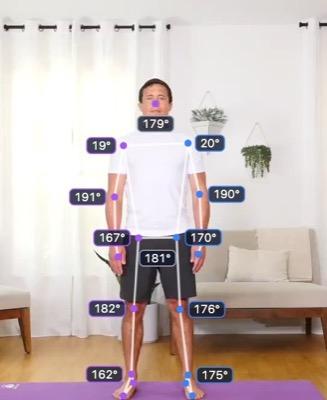
Start
stage_1
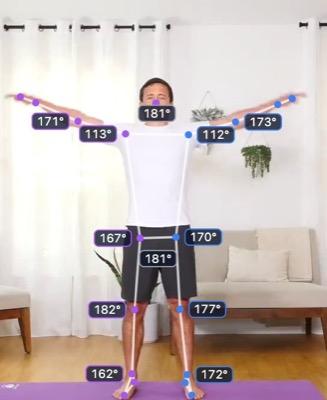
Rising
stage_2
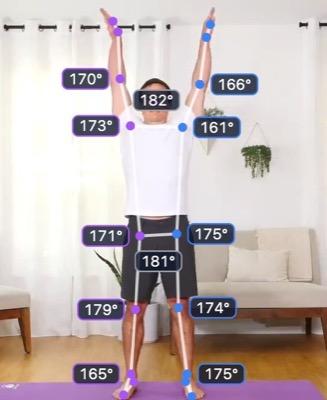
Top
stage_3
Rep logic
stage_1stage_2stage_3loop = 1 rep
Corrective feedback
Fault at Top · arms stop short of overhead
Cue: “Reach all the way up”
Exported as JSON — runs on any pose engine.
1
clip to build an exercise
0
frames to label
12
keypoints your model needs
Any
pose engine or platform
Skip the part that usually takes months
No dataset, no training
A rep counter is a sequence of stages, each a set of joint-angle windows captured from real video. You tag moments; nobody labels thousands of frames.
Keep the pose model you have
The file defines every angle from standard body keypoints, so it runs on the model you already ship. Counting happens on the device — your users' video never has to leave the phone.
Retune without a release
Exercises are JSON. Fetch them from your server and you can add a movement, widen an angle window or reword a cue without shipping an app update.
What you can build with it
Anything built on a repeated movement with clear stages — which is most of a workout.
Home workout apps
Count reps across a library of bodyweight and dumbbell movements, each one built from a single demonstration clip.
Rep counters→Form coaching
ProRecord the movement done wrong, tie the fault to the stage it happens in, and show your cue when a user's angles match it.
Corrective feedback→Apps that already track pose
Already running a pose model for something else? Rep counting becomes a JSON file and sixty lines of code, not a new machine-learning project.
Reference code→One exercise, every platform
The same file drives your iOS, Android and web apps, so an exercise tuned once counts the same way everywhere.
Integration guide→A growing exercise library
Add a movement in an afternoon: film it, tag the stages, export. Your runtime never changes, so each new exercise is just another file.
How counters are built→Challenges and streaks
Counted reps on-device are the raw material for leaderboards, streaks and timed sets — without asking users to tap after every rep.
How counting works→
From one clip to a shipped exercise
- 01
Film it done well
One clip of the exercise performed correctly, filmed in the plane the movement happens in.
- 02
Tag the stages
Scrub to the bottom, the top and anywhere between that matters. The angles at each frame become that stage's requirements, with a tolerance you choose.
- 03Pro
Record the faults
From a clip of the movement going wrong, tag the fault against its stage and write the cue your app should show.
- 04
Run it on your engine
Pick your engine in the Export tab — QuickPose, Apple Vision, ML Kit, MediaPipe, TensorFlow.js or a COCO-17 model — and get a ready-made runtime and adapter for it, in Swift, Kotlin, TypeScript or Python.
The whole runtime is about sixty lines
Measure each angle as a sweep between three keypoints, then step through the stages. It ships ready-made in Swift, Kotlin, TypeScript and Python, and every version is tested against the same clip: its angle maths agrees with the QuickPose engine's own output to within 0.1°.
See the full reference code→See a sample analysis→// Each angle: the clockwise sweep at the middle keypoint, in pixels.
function sweep(from: Point, vertex: Point, to: Point): number {
const ux = from.x - vertex.x, uy = from.y - vertex.y;
const vx = to.x - vertex.x, vy = to.y - vertex.y;
const deg = (Math.atan2(ux * vy - uy * vx, ux * vx + uy * vy) * 180) / Math.PI;
return deg < 0 ? deg + 360 : deg;
}
// Load the exported exercise once…
const counter = new RepCounter(loadExercise(await (await fetch(exerciseUrl)).text()));
// …then feed it every frame, from any pose engine.
const angles = jointAngles(keypointsFromYourModel);
const reps = counter.update(angles);
const cue = counter.fault(angles)?.message; // "Keep your elbow tucked in"Is it the right tool?
Worth knowing before you sign up, not after.
A good fit when
- Your app runs a pose model, or can add one — MediaPipe, ML Kit, Apple Vision, MoveNet or your own
- The exercise repeats through clear stages — a curl, a squat, a press, a lunge
- The movement happens mostly in a plane the phone can see
- You want to add and tune exercises without a model-training pipeline
Look elsewhere when
- Your model gives no 2D keypoints for the shoulders, elbows, wrists, hips, knees and ankles
- The movement is defined by the wrists, ankles, neck or trunk — Markerless measures those, but a counter works from shoulders, elbows, hips and knees
- The exercise is a hold or a flow with no repeating stages
- Your app is in a language other than Swift, Kotlin, TypeScript or Python — you would port the sixty-line runtime yourself
Rep counters are on every plan, from $29/month. Corrective feedback comes with Pro ($59/month) and above. The exported file is yours to run on any engine — only the QuickPose targets need the QuickPose SDK, which is licensed separately.
Compare plans→The features behind it
Rep counters
Tag the stages of a rep, export logic your app can run
Read more →Corrective feedback
ProIf this, then that — cues that fire when the movement goes wrong
Read more →Take the data with you
JSON and CSV for everything, with the provenance attached
Read more →Markerless pose tracking
Thirty-three body points, from a video you already have
Read more →
Also see: Markerless for biomechanists
Questions, answered
Which pose engines does it work with?
Any that gives you 2D keypoints for the shoulders, elbows, wrists, hips, knees and ankles — MediaPipe, ML Kit, Apple Vision, MoveNet, YOLO-pose, the QuickPose SDK, or a model of your own. Every exported file defines each angle in terms of those keypoints and lists the ones it needs, and the Export tab hands you a ready-made adapter for the common engines.
Do I need to train a model?
No. You bring the pose model — the one you already run, or any off-the-shelf one. What Markerless gives you is the logic on top: the stages of a rep, and the joint-angle windows that define each one, captured from a real clip of the movement.
Will the angles on my engine match what Markerless showed?
The formula is exact: on our reference clip, computed from the QuickPose engine's keypoints, it agrees with that engine's own angles to within 0.1°. What varies is where each model places the keypoints — one model's hip can sit a little higher than another's. The tolerance band absorbs most of that, but test each exercise on your engine and widen a band if a stage is missed.
Which platforms are supported?
Any. The JSON is platform-neutral, and ready-made runtimes ship for Swift, Kotlin, TypeScript and Python, each with adapters for the common engines on that platform — QuickPose and Apple Vision on iOS; QuickPose, ML Kit and MediaPipe on Android; MediaPipe and TensorFlow.js on the web; MediaPipe and COCO-17 models in Python. Anywhere else, the runtime is about sixty lines to port.
Can I update an exercise after my app ships?
Yes, if you fetch the exercise JSON from your own server rather than bundling it. Retuning an angle or rewording a cue then stops being an App Store release. Check the file's schema number before trusting it, so an old runtime fails loudly on a newer format instead of miscounting.
Does my users' video leave their phone?
Not for counting — the counter runs wherever your pose model runs, which on a phone means on the device. The clips you upload to Markerless to build exercises are stored in your team's workspace and are not used to train any model.