For biomechanists, sports scientists and coaches
Joint angles from the field, not just the lab
Film the movement where it actually happens. Markerless tracks 33 body points in every frame, measures fourteen joint angles from them, and hands you the time series as JSON or CSV — with a record of exactly how every number was produced.
Plans from $29/month · Cancel any time
Shoulder abduction
one real clip →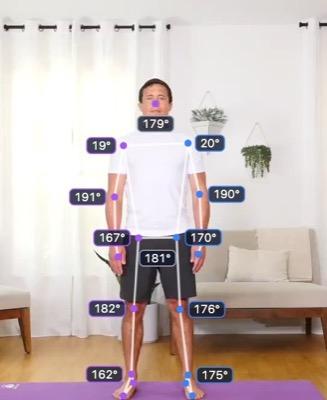
Start
shoulder 20°
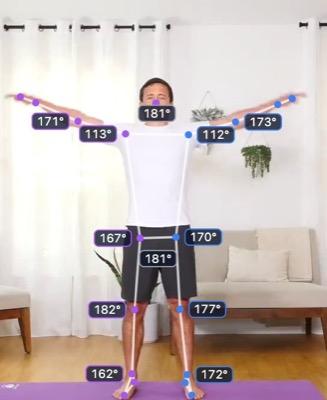
Rising
shoulder 112°
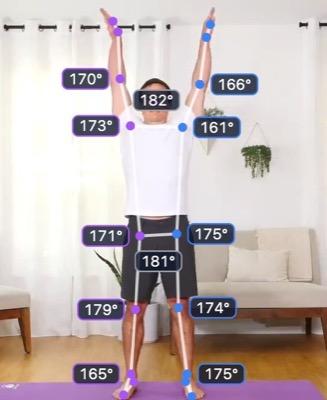
Top
shoulder 161°
Range of motion
| Left Shoulder | 19.8°–162.4° | 142.6° |
| Right Shoulder | 19.2°–173.7° | 154.5° |
Tagged
0:01.9Trunk check — low back moves under 1°, no lean
…plus twelve more joints, every frame, as JSON or CSV.
14
joint angles per frame
33
keypoints per frame
5
smoothing filters
0
markers to place
Built for people who check the numbers
Capture where movement happens
The training ground, the weights room, the track. No camera volume to book, and nobody moves differently because they are wired up in a lab.
Volume a lab session can't match
Nothing to place on anyone means no setup time per subject. Film a whole squad in one session and measure every clip the same way.
Provenance in every file
Each export says which joints were measured and which were calculated, which filter was applied and with what settings, and which section of the clip it covers.
Where it fits in your work
Markerless is strongest where you need to measure many people, often, in the place they actually train.
Field testing and squad monitoring
Film the same test every few weeks and follow range of motion across a season — measuring change on a like-for-like setup rather than quoting an absolute.
Range of motion→Technique analysis
Tag touchdown, peak flexion or the catch as named moments, mark the phase you care about, and read every joint through it frame by frame.
Tags, comments and clips→Before and after
ProPut this session next to one from six weeks ago, left against right, or one athlete against another — lined up on the same instant of the movement.
Side-by-side comparison→Research pipelines
Pull per-frame angles and all 33 landmarks into R, Python or MATLAB. One row per frame, one column per joint, with time from the start of the original video.
Data export→Teaching and student projects
Give a class real kinematic data from video they filmed themselves, without booking time on a motion capture system.
Markerless pose tracking→Deciding what needs the lab
Measure everyone, often, with markerless — and save marker-based sessions for the trials where an absolute 3D number has to stand up.
Markerless vs marker-based→
From clip to dataset
- 01
Film it
One fixed camera, square-on to the plane of the movement, whole body in shot. A phone is enough.
- 02
Check what the model saw
The tracked skeleton is drawn over your video, and joints whose tracking jumps are flagged — so you read the overlay before you trust a range.
- 03
Mark what matters
Trim to the phase you care about, tag key moments and save named clips. Every summary, chart and download follows the selection.
- 04
Smooth and export
Download angles, landmarks and tags as JSON or CSV. On Pro, put a Butterworth, Savitzky–Golay, median, moving-average or Kalman filter over them first.
What lands in your analysis
The angles CSV is one row per frame and one column per joint, numbered from the start of the original video even when you export a section. Comment lines above the header record anything that changes how the numbers should be read — the section covered, any smoothing filter, and which columns were calculated from landmarks rather than measured by the engine.
Everything in the exports→Open a real report like this→# Set 2: 0:03.4–0:07.9 of Back squat · side-on
# calculated from the landmarks, not measured by the engine: left_ankle
frame,time_s,left_hip,left_knee,left_ankle
102,3.400,171.8,176.2,93.1
103,3.433,169.5,173.9,93.6
104,3.467,166.1,170.4,94.4
105,3.500,162.0,166.1,95.5
106,3.533,157.4,161.3,96.8Is it the right tool?
Worth knowing before you sign up, not after.
A good fit when
- You need to measure a lot of people, or the same person often
- You are tracking change over time rather than quoting an absolute
- You compare like with like — same camera, same angle, same framing
- The movement happens in a plane you can film square-on
- Capturing where the movement really happens matters to you
Look elsewhere when
- You need a defensible absolute number for a study judged on accuracy — use a marker-based lab
- The movement rotates out of the filmed plane, where a 2D angle reads short
- The subject is heavily occluded, in loose clothing, or filmed as a silhouette
- You need capture running live on a device — that is the QuickPose SDK, not this
Range of motion, tags and exports are on every plan, from $29/month. Smoothing filters and side-by-side comparison come with Pro ($59/month) and above. Sharing one workspace across a lab or a coaching staff? Advanced includes 5 seats.
Compare plans→The features behind it
Range of motion
Fourteen joint angles, measured on every frame
Read more →Smoothing filters
ProFive ways to take the jitter out — and the research behind each
Read more →Side-by-side comparison
ProTwo measurements, lined up on the same moment
Read more →Tags, comments and clips
Pin what you noticed to the frame where you noticed it
Read more →Take the data with you
JSON and CSV for everything, with the provenance attached
Read more →Markerless pose tracking
Thirty-three body points, from a video you already have
Read more →
Also see: Markerless for fitness app developers · Indoor rowing · Indoor cycling
Questions, answered
Can I use markerless data in research?
Yes, with its limits stated. Every export records how it was produced — measured or calculated, which filter, which section of the clip — so the method can be reported exactly. We have not published a validation study against marker-based capture, so treat the numbers as a repeatable measure of what the camera saw: well suited to tracking change and comparing like with like, not a lab-grade absolute.
Which joints does it measure?
Fourteen, on every frame: the neck, both shoulders, elbows, wrists, hips, knees and ankles, and the trunk's lean off vertical. Eight are measured by the pose engine itself; the other six are calculated from the tracked landmarks. Every figure on screen and in every download says which is which.
Is it 2D or 3D?
The angles are 2D, measured in the camera's plane from a single video. That is why framing matters: film square-on to the plane of the movement and a 2D angle answers most practical questions — a knee through a squat, an elbow through a curl. A joint rotating out of that plane reads short.
Can I get the raw keypoints?
Yes. All 33 landmarks export per frame as JSON or CSV, in normalised coordinates with the frame size recorded so you can convert back to pixels, plus depth and visibility per point where the engine provides them.
Can colleagues work on the same data?
Yes. Videos, measurements and clips belong to a team rather than a person. Invite colleagues by email and switch between teams from the nav; the number of seats depends on your plan.